
Overview
Magic Links elevate the utility of printed QR codes by allowing their associated URLs to be updated anytime within your Fliqr AI platform, significantly enhancing their longevity and value.Key Concepts
Title Permanence
Assign a fixed, unchangeable title to each Magic Link. Choose a single, descriptive word for the title, using underscores (_) instead of spaces to combine words, if necessary.
URL Flexibility
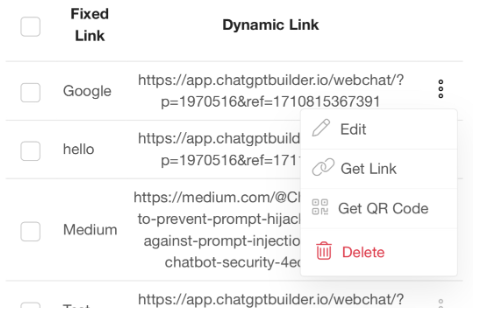
The URL connected to this title is not fixed, offering the liberty to modify the link whenever necessary. This feature is invaluable for keeping printed QR codes relevant over time.
Step-by-Step Guide
Accessing Marketing ToolsFind the Magic Links option in the Marketing tools section of the Fliqr AI platform.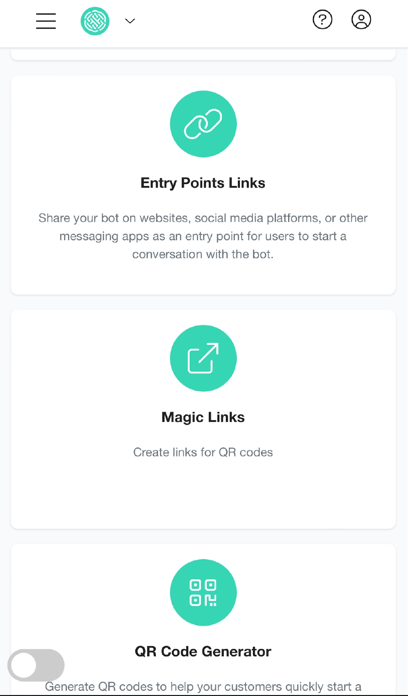
Creating a Magic Link
- Click on ‘Magic Links’.
- Press ‘Add’ to establish a new link.
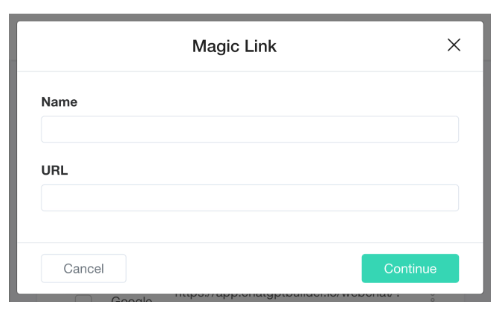
- In the ‘Name’ field, input your permanent title.
-
In the ‘URL’ field, provide the initial URL you desire to link.
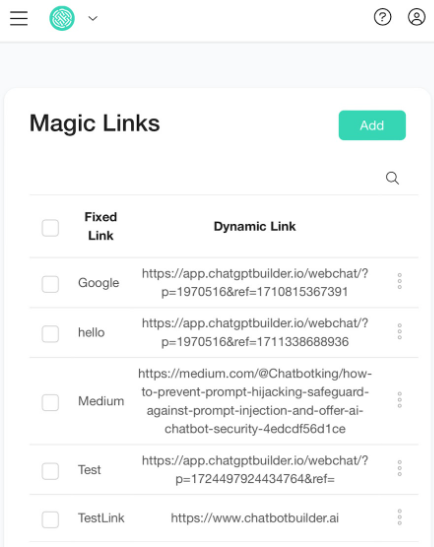
Important Notes
The title for a Magic Link is static and serves as the QR code’s identifier; it is crucial to select this title thoughtfully as it cannot include spaces.
The dynamic URL can be updated at will, optimizing printed materials’ efficacy by allowing the QR code to direct to updated online content.